
What is Nivesh Mitra Portal? Learn How Business Setup Became Easier! | Nivesh Mitra portal (V2.0) | Nivesh Mitra (Single Window Clearance)
Nivesh Mitra portal (V2.0) is a flagship digital initiative of the Uttar Pradesh Government, aimed at simplifying the process of starting and operating businesses in the state. It is a single-window system where entrepreneurs can obtain permits, licenses, and NOCs from various departments on a single platform. Launched in 2018, this portal focuses on providing transparency, efficiency, and time-bound services. Through it, all processes such as application, payment, and tracking become online, helping entrepreneurs start businesses quickly and promoting investment.
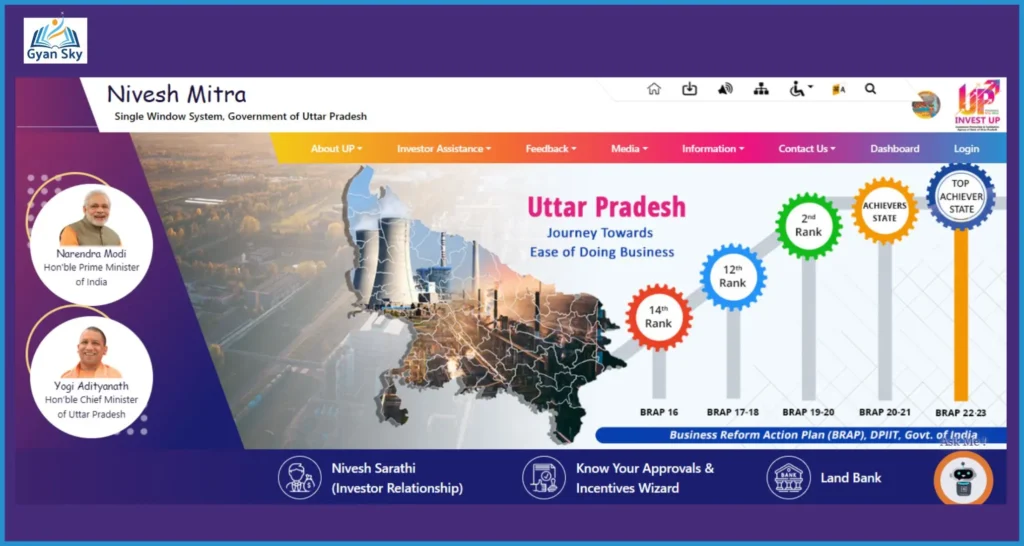
Latest Version: The government has recently launched Nivesh Mitra 3.0, aiming to further simplify business processes with “one interface, complete control.”
What is Nivesh Mitra Portal?
- The Nivesh Mitra portal is a single-window digital platform launched by the Uttar Pradesh government.
- It is operated by Invest UP.
- This portal facilitates entrepreneurs to obtain all government permits, licenses, and NOCs in one place.
- Launched in 2018, the portal was created with the objective of promoting Ease of Doing Business.
- Integrates 160+ services from 20+ departments (300+ services in the new version).
- Application, fee payment, and tracking are entirely online.
- Nivesh Mitra 3.0 version is based on the principle of “one interface, complete control.”
Vision of Nivesh Mitra
- To create an industry-friendly environment where processes are simple and fast.
- To promote investment through progressive policies and digital systems.
- To integrate processes by establishing coordination among all departments.
- To develop a time-bound approval system.
- To make the state attractive and competitive for investment.
Mission of Nivesh Mitra
- To make compliance easy and user-friendly.
- To implement regulatory reforms.
- To simplify processes for investors.
- To provide quality services transparently.
- To ensure complete digitization of all departmental processes.
Objectives of Nivesh Mitra
The primary objective of the Nivesh Mitra portal is to make the process of doing business in Uttar Pradesh simple and effective. This portal provides a platform where entrepreneurs can obtain all necessary licenses, approvals, and clearances in one place.
- The most important objective is ease of approvals. Earlier, obtaining permits from different departments took considerable time and effort, but now this process can be completed through a single portal.
- The second objective is regulatory reforms. Through Nivesh Mitra, the government has simplified many rules and procedures, making it easier for businesses to comply.
- The third important objective is transparency. This portal provides a digital and trackable system, allowing applicants to view the status of their applications in real-time. This reduces corruption and delays.
Additionally, this portal is designed to promote ‘Ease of Doing Business’. It offers facilities such as online application, online fee payment, and application tracking.
The Nivesh Mitra portal provides a single online interface where users can access all services related to information, NOCs, licenses, and approvals. It also ensures a time-bound approval system, so entrepreneurs can receive services within a stipulated timeframe.
Key Features
The key features of the Nivesh Mitra portal make it a powerful and useful platform. It is a completely online system where the entire process, from application to approval, is completed digitally.
The most important feature of this portal is the Common Application Form (CAF), through which users fill their information once, and the same information is automatically used in multiple applications. This saves both time and effort.
Additionally, the portal uses Single Sign-On (SSO) technology, allowing users to access all services with a single login.
Complete information on the application process, checklists, fees, and timelines is available on the portal, enabling users to apply without any confusion. Also, the application status can be tracked online, and SMS/email notifications are received at every stage.
Other important features include:
- Integrated fee payment system
- Third-party verification
- GIS-based land bank information
- Inter-departmental information sharing
- Centralized information availability
All these features combined make Nivesh Mitra a modern and effective digital platform that provides a better experience for entrepreneurs.
Benefits
- Single-Window Clearance: Services from multiple departments in one place.
- Time Savings: Faster approvals through digital processes.
- Transparency: Clarity with real-time tracking.
- Guidance: User manuals and help system available.
- Grievance Redressal: Prompt resolution of issues.
- High Success Rate: Resolution in approximately 98% of cases.
- CAF Facility: No need to fill information repeatedly.
Advanced Features
- Real-time data analytics and dashboards.
- Grievance management system and chatbot.
- Automated response and notification system.
- Real-time escalation mechanism.
- Incentive management system.
- District Ease of Doing Business ranking.
Government Orders
- All industrial applications will only be accepted through the Nivesh Mitra portal.
- Only one inquiry within 7 days of application.
- All licenses and NOCs issued in digital/e-signed form.
- Service timelines fixed (Public Service Guarantee Act).
- Ensuring high-level review of applications.
Implementation Methodology
- Integration of 300+ services from 27+ departments.
- Services like pollution, fire, and electrical safety included.
- Process Re-engineering.
- Defined timelines and accountability.
- Robust grievance redressal and feedback system.
How to Register on Nivesh Mitra?
- Visit the official website: First, open the official website of Nivesh Mitra (niveshmitra.up.nic.in). On the homepage, you will see the “Entrepreneur Login” section, where the “Register Here” option is available.

- Select Registration Option: After clicking “Register Here”, the Entrepreneur Registration Form will open. This is the first and most important step.
- Fill in basic details: In this form, you need to enter your name, company name, email ID, and mobile number. Ensure that all information is correct and updated, as the further process depends on it.
- Verify OTP: An OTP (One-Time Password) will be sent to the registered mobile number and email ID. Enter it correctly to verify your registration.
- Receive Login Credentials: After OTP verification, you will receive your User ID and Password via email or SMS. Keep it safe as it will be required for future logins.
- Log in to the portal: Now go back to the homepage and log in using your User ID and Password in the “Entrepreneur Login” section.
- Fill Common Application Form (CAF): After logging in, you will need to fill the “Common Application Form (CAF)”. This involves entering detailed business information such as industry type, location, investment, etc.
- Upload Documents: Scan and upload required documents such as ID proof, company registration certificate, etc.
- Pay Fees: Deposit the processing fees for related services online (net banking/other options).
- Submit and Track Application: After filling all information, submit the application. You can track the status of your application in real-time by logging into the portal.
- Download Certificates: After the application is approved, you can download NOCs, licenses, or other certificates directly from the portal.
How to Log In to Nivesh Mitra Portal?
- Visit the official website: First, open the official website of the Nivesh Mitra portal (niveshmitra.up.nic.in). This portal is a single-window platform operated by the Uttar Pradesh government, from where all services are accessed.

- Select Login Section: On the homepage, you will see the option “Entrepreneur Login” or “Entrepreneur/Admin Login”. Entrepreneurs and officials access the portal through this section.
- Enter User ID/Email: On the login page, enter your registered User ID or email ID. This is the same ID that was created during registration.
- Enter Password: Now carefully enter your password. Note that the password is case-sensitive, so use the correct characters.
- Fill Captcha Code: For security, enter the given captcha correctly. This ensures that the login process is secure and not accessed by a bot.
- Click Login Button: After filling all information correctly, click the “Login” button. You will then enter your dashboard.
- Use Dashboard: After logging in, you can use various services, such as applying for NOCs, obtaining licenses, tracking application status, and downloading documents.
- If you forget your password: If you forget your password, click on the “Forgot Password” option. You can then reset your password via OTP or email.
Important Information:
- New Registration: If you are not registered, first use the ‘Registration & Account Activation’ option to enter your company details, name, and mobile number.
- Facilities: After logging in, you can apply for online NOCs, licenses, and various government permits.
- Help: If you have forgotten your password or login ID, use the ‘Forgot your Login ID/password?’ link.
Nivesh Mitra portal (V2.0) Investor Process PDF
FAQs: Nivesh Mitra portal (V2.0)
1. How do I find the approvals required for my industry?
- The “Know Your Approvals” wizard is available on the portal. https://niveshmitra.up.nic.in/Default.aspx
- Click on the “Know Your Approvals” button on the homepage or go to the “Investor Assistance” tab.
- Select the “Approvals for Entrepreneurs” option.
- Fill out the given questionnaire.
- You will get a list of all required licenses/permits according to your business.
2. Where can I find government orders, circulars, acts, or ordinances?
- Go to the “Information” tab on the homepage.
- Select “Government Orders and Circulars” or “Acts and Ordinances” option.
- You will be redirected to the relevant website.
- From there, you can view and download the necessary documents.
3. Where can I find information about Uttar Pradesh policies?
- Click on the “Information” tab.
- Select the “Policies” option.
- A list of all policies will be displayed.
- Select the relevant policy according to your requirement.
4. How to get information about schemes available for investors?
- Go to the “Information” tab.
- Select “Policies” or “Schemes”.
- Select the appropriate scheme from the list of schemes.
5. Is a user manual available?
- Yes, a detailed user manual is available.
- Go to the “User Manual” section on the homepage.
- It includes:
- Registration process
- CAF filling process
- Guide to applying for services
- Select documents as needed.
6. How to register online?
Online registration process is fully explained above in this article – you can refer to it.
7. What is the registration process for startups?
- Startup registration is similar to the general registration process.
- Refer to the user manual for step-by-step guidance.
8. What to do if I forget my password?
- Click on the “Forgot Password” option.
- Reset password via OTP or email.
- Detailed instructions are available in the user manual.
9. Are email and mobile number mandatory for registration?
- Yes, both are mandatory.
- They are required for OTP verification.
10. Can I apply for multiple units with one User ID?
- Yes, multiple units can be added with the same login.
- Separate applications can be made for each unit.
11. What happens if incorrect information is filled?
- Information can be edited before submission.
- Changes are not possible after submission.
- Therefore, be careful while filling information.
12. In what format should documents be uploaded?
- File format and size vary according to each service.
- Refer to the instructions in the “Attachment Section” of the relevant form.
13. Where can I get help with filling out forms?
- Go to the “Investor Assistance” tab.
- Select the “Approvals, Checklists, Procedures and Timelines” option.
- Select the relevant service/form to get instructions.
14. Do I receive notifications about the application status?
- Yes, updates are received via SMS and Email.
- Notifications are sent for application submission, approval, rejection, or query.
15. Is a checklist of documents available for each service?
- Yes, it is available in the “Investor Assistance” section.
- You can view the checklist by selecting the relevant service.
16. Is there a fixed timeline for approvals?
- Yes, a timeline is fixed for each service.
- Refer to the details in the “Investor Assistance” section.
- This is implemented under the Public Service Guarantee Act.
17. Is a helpline available?
- Yes, helpline numbers: +91-522-2720236, 2720238
- Timing: 9:30 AM to 6:00 PM
- Email: nivesh.mitra-up@gov.in
18. What if my question is not in the list?
- Contact the helpline number.
- Or get assistance via email.
19. Where can I find departmental contact details?
- Go to the “Contact Us” tab.
- Select the “Department Contacts” option.
- View the list of relevant departments.
20. How to file a complaint or provide feedback?
- Go to the “Feedback” tab.
- Select the “Grievance Redressal” option.
- Fill out the form and submit the complaint/feedback.
- You can also contact through the helpline.
Conclusion: Nivesh Mitra portal (V2.0)
Nivesh Mitra portal (V2.0) is an effective digital platform that simplifies, accelerates, and makes transparent the process of starting and operating a business in Uttar Pradesh. By providing services from various departments through a single-window system, it saves both time and effort for entrepreneurs. Features like online application, fee payment, tracking, and time-bound approvals make it extremely useful. Additionally, by promoting transparency and accountability, it strengthens investor confidence. Overall, this portal plays a significant role in enhancing Ease of Doing Business and boosting economic growth in the state.
Related Articles:-
SIP Investment: Understand What SIP Is and How to Start Investing!
Paytm vs PhonePe – Which is the Right Choice for Investment?
Types of SIP: Learn How to Choose the Right SIP Investment Option!
Mutual Fund: Understand What It Is and How to Invest!
NAV in Mutual Fund: What is NAV? Learn Its Calculation and Importance!
Calculation of Mutual Fund Return: How to Evaluate Your Investment?
What is the Stock Market and How Does It Work?
Demat Account: Understand What a Demat Account Is and How It Works?
How to Open Demat Account: Open Your Demat Account from Home!